
Back to use cases
Use case
Hybrid event platform for the room, the stream, and the organizer stuck between them.
Bewitt helps organizers run physical and virtual event experiences with registration, session access, speakers, participant communication, engagement, check-in, and reporting in one event workspace.
Hybrid Events
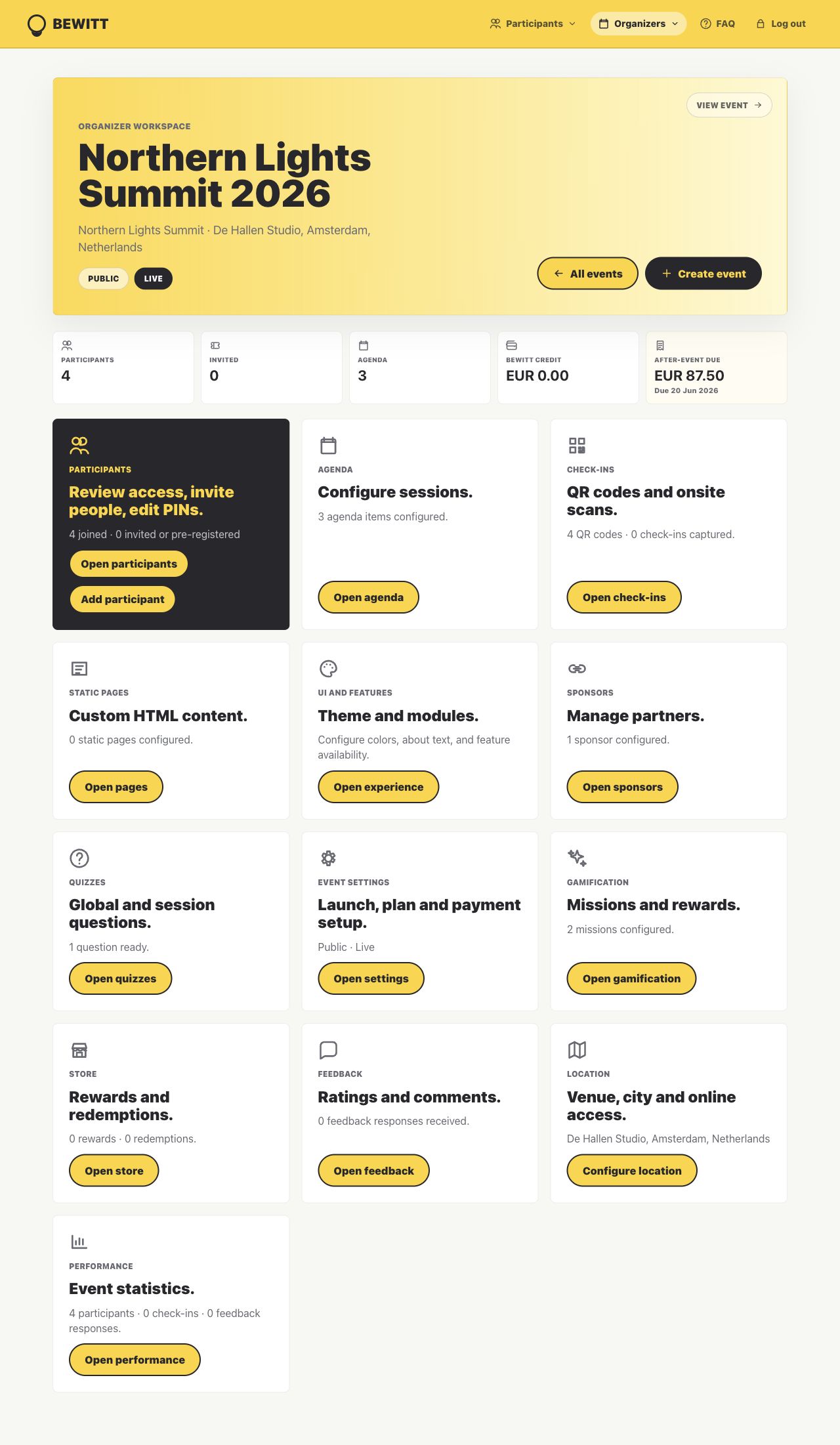
Bewitt keeps the organizer work close: page, registrations, agenda, access, check-ins, engagement, feedback, and reporting.
Shared registration, agenda, session access, communication, and feedback across physical and virtual attendance.
Hybrid event operations where the room and the stream should not create two separate admin piles.
Product proof
This is more than a hybrid events page.
Bewitt works best when the event has moving operational parts: the page people see, the registrations behind it, agenda changes, access, check-in, feedback, and the report organizers need afterwards.
Create the event once
The public page, registration path, access rules, agenda, speaker details, sponsors, and participant view stay attached to the same event workspace.
Keep changes close
When the list, agenda, rooms, or participant access changes, organizers have one operational record to check instead of several drifting versions.
Finish with evidence
Check-ins, attendance, feedback, ratings, engagement, and recap data remain available for reporting after the event ends.
Why Hybrid Events Are Different
Hybrid events are not just in-person events with a link added at the end.
Bewitt keeps the shared event work together so organizers can manage the room, the stream, and the participant record from the same place.
Two audiences need one event story
Hybrid events have people in the room and people joining online. The event needs to feel connected even when the experience is not identical.
Access details multiply quickly
Locations, livestream links, session access, speaker notes, timing changes, and participant questions all need one reliable place to land.
Engagement can split by format
Feedback, participation, check-ins, and activity signals become harder to read when onsite and online participants live in separate tools.
Registration Management
Register onsite and online participants without splitting the guest list.
Use Bewitt to manage registrations, participant access, attendance format, invitations, imports, and check-in records from one hybrid event workspace.
One participant record
Keep onsite and online attendance tied to the same event instead of maintaining separate lists.
Access and invitations
Invite participants, manage private access, and keep practical joining details close to the registration record.
Check-in where it matters
Use QR check-ins for the physical room and participant activity signals for the online side.
Livestream and Session Access
Keep livestream details and session access attached to the event.
Bewitt helps organizers publish online joining details, session links, locations, and agenda context so participants know where to go and how to join.
Online joining details
Add livestream or virtual session links where participants already look for agenda and event access.
Room and stream context
Show location details and online access together when a session has both physical and virtual participants.
Session-level clarity
Keep timing, speaker, access, and feedback details close to each session.
Speaker Management
Help speakers show up clearly across both formats.
Manage speaker profiles, session ownership, bios, timing, and agenda context so speakers are not trapped in a separate planning document.
Speaker profiles
Add names, bios, and session details that participants can find before the talk starts.
Session ownership
Connect speakers to the sessions they lead, whether the room is physical, online, or both.
Last-minute edits
Keep speaker and agenda changes attached to the event instead of sending another “final version” file.
Participant Communication
Give every participant a clear place to check before and during the event.
Hybrid participants need practical instructions: where to go, where to click, what starts next, and how to give feedback. Bewitt keeps that close to the event page.
Shared event page
Use one event home for registrations, agenda, access details, and participant actions.
Format-aware details
Keep physical locations and online joining details visible where they matter.
Feedback moments
Ask participants for session or event feedback while both audiences still remember what happened.
Event Engagement
Create engagement that works for the room and the remote audience.
Use missions, quizzes, rewards, networking prompts, QR activity, and feedback when they help both sides participate in the same event.
Optional activity layer
Turn on engagement when it gives the event energy, and leave it off when the session needs focus.
Networking prompts
Support participant connection when hybrid attendance makes chance encounters harder.
Unified feedback
Collect ratings and comments without forcing onsite and online feedback into separate tools.
Before/During/After Event Workflow
One hybrid event record across the room and the stream.
The point is not more admin. It is fewer scattered places to check when the event starts moving.
Create the event page, open registration, add agenda and speaker details, set locations and livestream links, and prepare participant access.
Manage onsite check-ins, online session access, agenda updates, participant communication, engagement, and feedback from one workspace.
Review attendance, check-ins, feedback, ratings, and activity signals across the physical and virtual sides of the event.
Pricing
Hybrid event pricing that does not change because the format is complicated.
Bewitt uses event-based pricing: €54.00 base fee, €5.50 per event day, and €0.55 per participant. Self-service hybrid events are capped at 500 participants; larger events can request a custom quote.
€54.00 + €5.50 + €55.00
€54.00 + €11.00 + €137.50
€54.00 + €16.50 + €275.00
FAQ
Questions organizers ask before moving their event into Bewitt.
Can Bewitt be used as a hybrid event platform?
Yes. Bewitt helps organizers manage hybrid events with registration, agendas, speakers, participant access, livestream details, check-ins, engagement, feedback, and reporting in one workspace.
Does Bewitt support livestream links and virtual session access?
Yes. Organizers can add online joining details and session access information so virtual participants know where to go and how to join.
Can Bewitt manage onsite check-in for hybrid events?
Yes. Bewitt supports QR check-ins for physical attendance while keeping participant information and event activity connected to the same hybrid event.
Does Bewitt support engagement for hybrid participants?
Yes. Bewitt supports feedback, quizzes, missions, rewards, networking prompts, QR activity, and other optional engagement tools that can support both onsite and online participants.
How is Bewitt priced for hybrid events?
Bewitt uses event-based pricing: €54.00 base fee, €5.50 per event day, and €0.55 per participant. Self-service events are capped at 500 participants, with custom quotes available above that.
Related use cases
Other event shapes organizers run with Bewitt.
Use Bewitt for Hybrid Events
Ready to keep the event work in one place?
Start with the event page, then keep registrations, agenda, speakers, check-ins, engagement, feedback, and reporting connected as the event grows.
