
Emma Session Planner
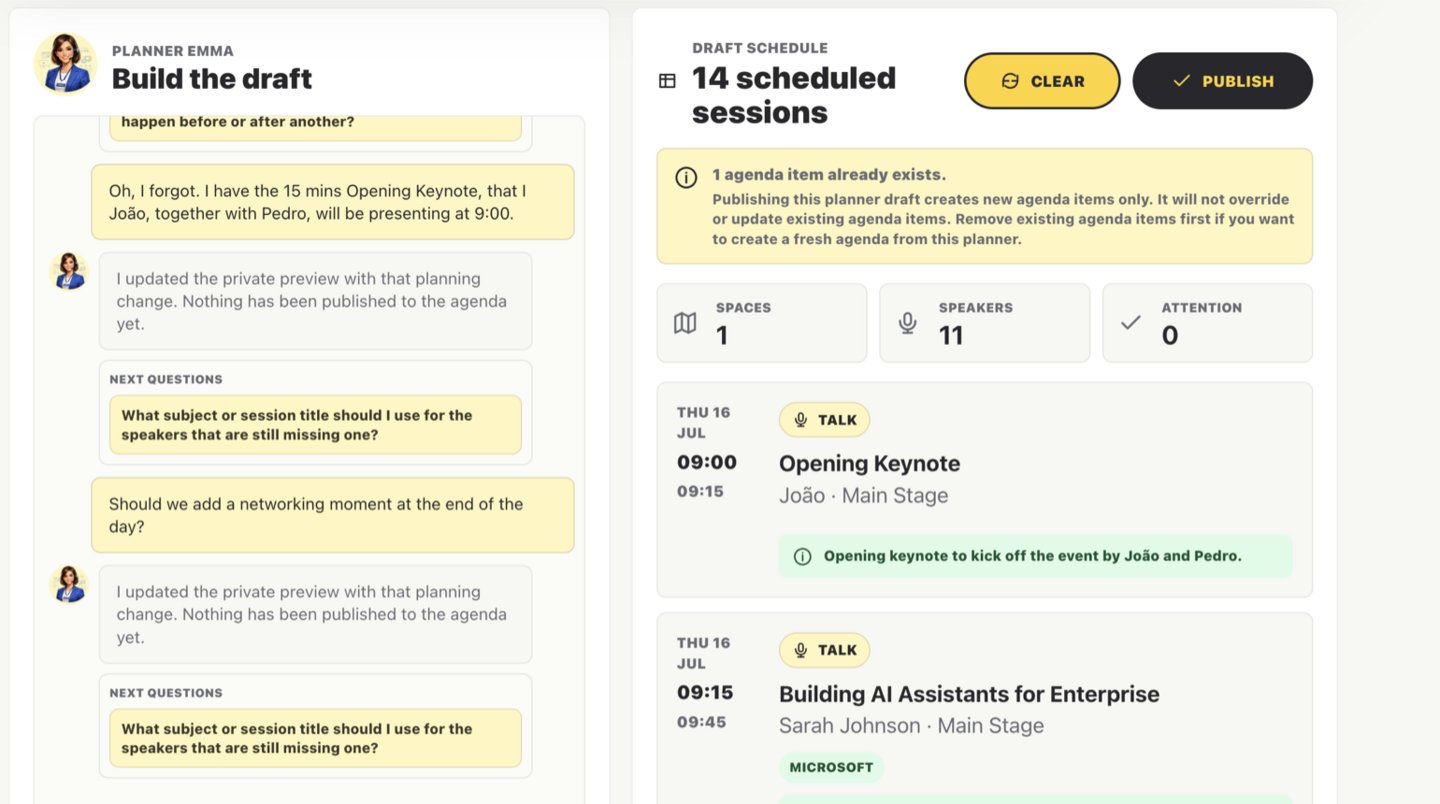
Use a private planning mode where Emma drafts the running schedule from spaces, speakers, availability, breaks, and constraints before you publish agenda items.
Event Agenda Management Software
Bewitt is event agenda management software for organizers who need to create, manage, and share schedules without juggling spreadsheets, PDFs, speaker notes, and last-minute email updates.
Keep sessions, speakers, locations, signups, and attendee planning in one practical event workspace.
Use Bewitt as your event schedule software when the agenda needs to stay useful after the first change.
The problem
The agenda looked perfect on Monday. By Wednesday, a speaker moved rooms, a workshop reached capacity, two sessions swapped times, and someone is still using the PDF from three versions ago.
Then come the attendee questions. "Where is this session?" "Has the keynote moved?" "Can I still join the workshop?" "Which room is Track B in?" "Is this printed schedule still correct?"
Meanwhile, organizers are updating spreadsheets, speaker documents, web pages, signs, and emails, all while pretending this was definitely accounted for in the plan.
Bewitt helps keep the agenda useful after the first change, not just before the event starts.
The solution
Bewitt gives organizers event agenda software for building schedules, organizing sessions, managing speakers, sharing updates, and helping attendees plan their day.
Create multi-day agendas, add session details, show speaker information, manage capacity, and keep attendees pointed toward the right rooms and activities without maintaining five versions of the same schedule.
The agenda becomes part of the event experience, not a static document that ages badly by lunchtime.
Emma Session Planner
Session Planner gives organizers a draft workspace for the hard part of agenda work: matching speakers, rooms, availability, breaks, lunch, and last-minute changes before anything becomes public.
Agenda features
Use a private planning mode where Emma drafts the running schedule from spaces, speakers, availability, breaks, and constraints before you publish agenda items.
Plan events that run across several days without turning the schedule into a maze of tabs, notes, and crossed-out time slots.
Keep session titles, times, descriptions, tracks, and changes organized so attendees know what is happening and when.
Give attendees useful speaker context before they choose a session, instead of hiding the details in a separate document.
Let attendees build their own plan for the day so they spend less time asking where to go and more time actually getting there.
Allow participants to sign up for the sessions that matter to them, especially when workshops, breakouts, or limited seats are involved.
Keep popular sessions under control before the room becomes optimistic about fire codes.
Make rooms, stages, booths, and activity areas clear so attendees do not need a treasure map to find the next thing.
Share schedule changes from the event workspace so attendees and organizers are working from the same version.
Event scenarios
Conference agenda management often means multiple tracks, rooms, speakers, sponsor sessions, workshops, and changes across one or more days. Bewitt helps organizers keep the full schedule understandable.
Workshops need clear timing, capacity, session details, and participant planning. Bewitt helps keep attendees informed before the room fills up.
Company events often mix plenary sessions, breakouts, training, networking, and team activities. Bewitt helps employees know where they need to be without another all-hands email.
University events can involve students, staff, guests, societies, recruiters, and departments. Bewitt helps make the agenda easier to browse, join, and follow.
Comparison
| Traditional Approach | Bewitt |
|---|---|
| PDF agendas that go stale | A central agenda attendees can rely on |
| Printed schedules | Agenda updates available from the event workspace |
| Email updates for every change | Clear schedule changes without inbox chaos |
| Spreadsheet planning | Organized sessions, tracks, speakers, and locations |
| Separate speaker documents | Speaker information connected to sessions |
| Manual session lists | Session signups and capacity managed together |
| Attendees asking where to go | Clear times, locations, and personal agendas |
| Last-minute version confusion | One event schedule everyone can work from |
An agenda should do more than list times on a page.
With Bewitt, agendas connect directly with registrations, session signups, check-ins, speakers, feedback, and quizzes.
That means attendees can use the schedule to plan their day, join sessions, find speaker details, check in, answer quizzes, and give feedback where it belongs.
Organizers do not need the agenda in one tool, signups in another, speaker notes somewhere else, and session feedback in a fourth place.
The schedule becomes part of the event experience, not a static document hoping nobody changes anything.
FAQ
Yes. Bewitt supports multi-day agendas, so you can organize sessions across several days, tracks, and locations.
Yes. Attendees can build a personal agenda so they can plan which sessions they want to attend.
Yes. You can manage capacity for sessions where seats, rooms, materials, or staffing are limited.
Yes. Event schedules change. Bewitt lets you update the agenda after publishing so attendees can follow the current version.
Yes. You can add speaker details to help attendees understand who is presenting and why a session may be relevant.
Yes. Bewitt can support events with multiple tracks, rooms, themes, or parallel sessions.
Yes. Participants can sign up for sessions, which is useful for workshops, breakouts, training, and limited-capacity activities.
Yes. Session feedback can connect to the agenda so organizers can understand what worked at a more useful level than "the event was nice."
Create a clearer agenda, keep changes organized, and help participants plan their day without chasing outdated PDFs or email updates. Bewitt gives organizers flexible event schedule software for sessions, speakers, locations, signups, and attendee planning.
