
Before the room fills
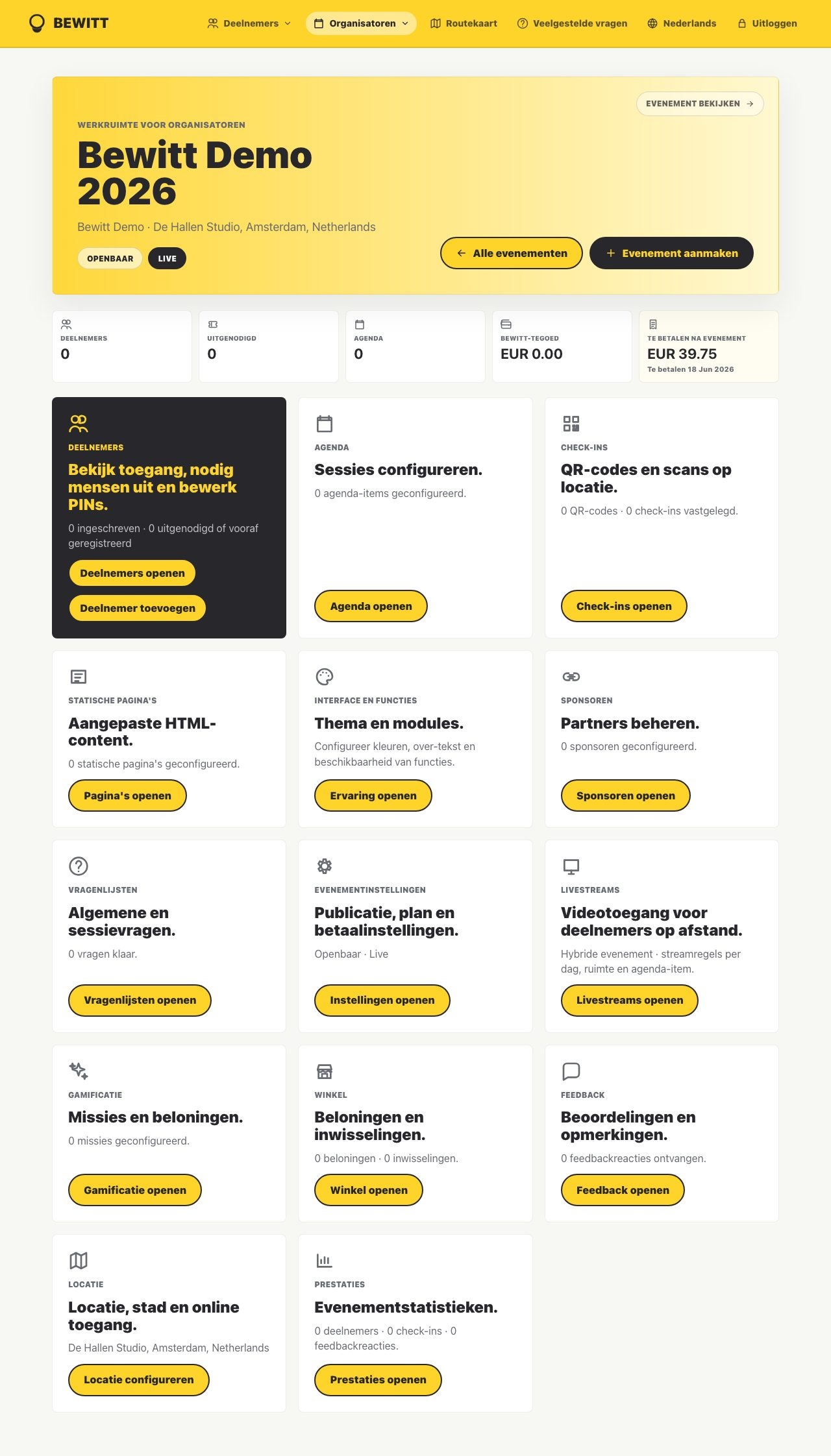
Set up registrations, access, tickets, branding, pages, agenda, speakers, sponsors, and team permissions from the event workspace.
Product
Bewitt brings registration, tickets, agenda, check-ins, participant access, sponsors, networking, engagement, feedback, domains, and reporting into one browser-based product: the organizer side keeps the event under control, while the attendee side gives people a clear place to register, join, participate, and follow what is happening.
Product shape
An event starts with planning, becomes a live operation, and ends with evidence. Bewitt keeps those stages connected so organizers do not have to keep proving which list, schedule, or report is current.
Set up registrations, access, tickets, branding, pages, agenda, speakers, sponsors, and team permissions from the event workspace.
Use QR check-ins, participant lookup, session updates, sponsor visibility, networking, quizzes, missions, and rewards without splitting the live event across tabs.
Review attendance, feedback, ratings, engagement, and reporting signals while they still mean something.
Organizer perspective
Organizers need a product that can absorb detail without hiding it. Bewitt keeps planning, registration, event-day operations, and reporting close together, so the team can make decisions from the same context.
The event page, participant list, agenda, check-ins, feedback, domains, and reports all point back to the same event instead of drifting into separate systems.
Organizers can adjust access, publish changes, invite people, manage payments, add sponsors, and keep event-day work visible to the team.
Attendance, participation, ratings, engagement, and feedback can be reviewed without rebuilding the story from exports after everyone leaves.
Attendee perspective
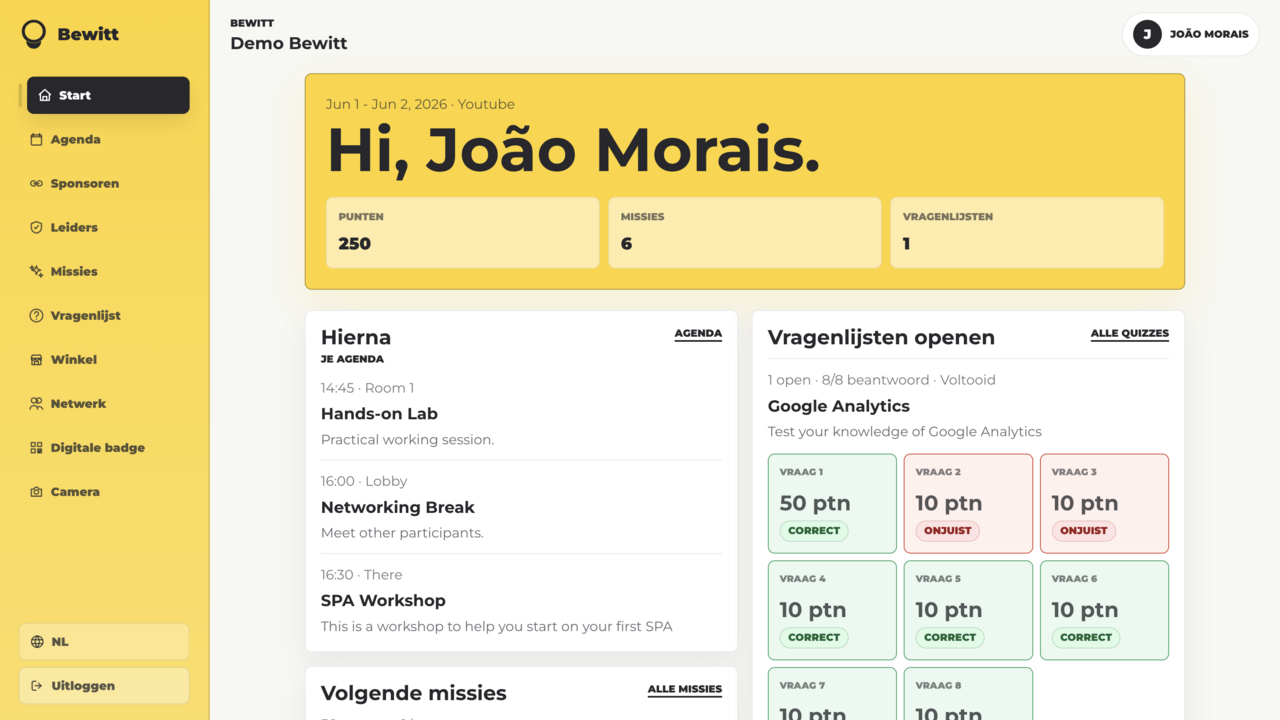
Attendees should be able to register, open the agenda, show a QR code, find the right room, interact when useful, and give feedback without installing another app or decoding organizer logistics.
Attendees get a direct route to registration, event access, QR codes, tickets, and the event details they need without hunting through email threads.
The participant experience keeps sessions, speakers, locations, sponsors, networking, quizzes, missions, rewards, and feedback close together in the browser.
When the format calls for it, organizers can add missions, quizzes, points, rewards, and networking so attendees have useful actions beyond simply showing up.
Participant app
The attendee side runs in the browser. That keeps access lightweight while still supporting agenda views, participant profiles, networking, missions, sponsor moments, rewards, feedback, and event-specific content.
Evenementcyclus
Bewitt is intentionally broad because events are broad. Each stage links to the feature pages that explain the specific product areas in more detail.
Organizers create the event page, registration rules, tickets, agenda structure, branding, access, teams, and sponsor areas before the event starts asking for attention.
On event day, the same workspace supports arrivals, QR check-ins, session changes, participant lookup, sponsor visibility, networking, and agenda updates.
Afterwards, attendance, feedback, ratings, points, rewards, sponsor activity, and participant signals remain connected so teams can report and improve.
Feature pages
The Product page gives the full shape. Feature pages go deeper on the pieces organizers and attendees touch most often.
Create event pages, collect signups and custom fields, manage access, and keep registration connected to the event record.
Sell tiered tickets, run free events, apply discount codes, and keep payment choices close to participant access.
Build sessions, locations, speaker details, and schedule updates in one place.
Use QR check-ins for arrivals, rooms, sessions, sponsor moments, and activity points.
Help participants discover, connect, and follow up when networking belongs in the format.
Add missions, points, quizzes, and activity prompts when participation needs structure.
Use interactive quizzes to reinforce learning, encourage participation, and make sessions more memorable.
Connect rewards and redemptions to event activity, sponsor moments, or participant achievements.
Give partners visibility inside the event experience without burying details in a PDF.
Collect ratings, comments, attendance signals, and reporting data while the event is still useful.
Let organizer teams share the same event workspace instead of splitting work across inboxes.
Give participants a browser-based place for agenda, access, check-in, feedback, and event actions.
Shape logos, colors, pages, navigation, domains, and participant journeys around the event identity.
Run registration, agenda, check-ins, and event information under a branded event domain.
Create a workspace to try the flow yourself, or book a demo if you want to map Bewitt against a real event plan.
